Boardrooms & town halls
The meetings everyone remembers, in the room and on the stream.
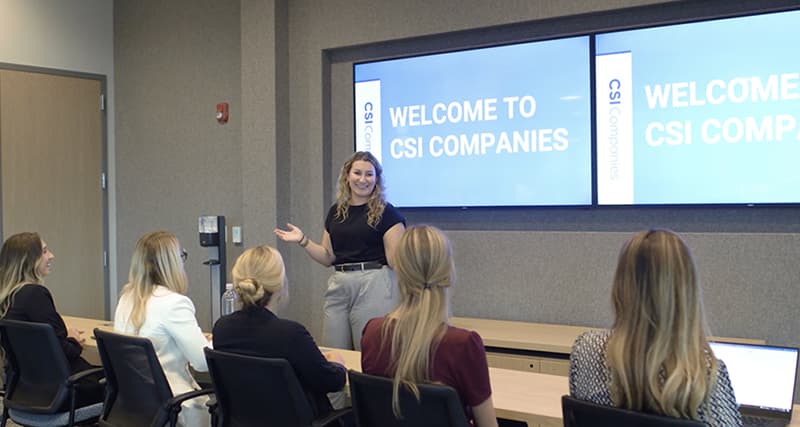
Boardrooms where every face is on camera and every voice is clear, and town halls with an LED wall, presenter audio and a stream that works for everyone watching from somewhere else.
Enlarged section: boardroom and town hall
Choose a note to see where it sits. A town hall has two audiences, the room and the stream, and each note serves one or both.
Phase Integration plans, designs and manages technology for boardrooms, executive spaces, town halls and training rooms: displays and LED walls, cameras that follow the conversation, ceiling and presenter microphones, speakers, lighting for camera, and the streaming and recording behind an all-hands. We run the project the way a general contractor runs a job, alongside your IT and communications teams.
These are the rooms where the stakes are highest: the board meeting with a director joining from another city, the quarterly all-hands with half the company watching remotely. They need more than a bigger conference room: cameras that frame whoever is speaking, audio that works for a lectern and a room full of questions, and a stream that looks and sounds as good as being there.
Town halls that work on the stream
A hybrid town hall has two audiences: the people in the room and the people watching. The room needs an LED wall sized to the back row, a confidence monitor so the presenter can see slides and remote questions without turning around, and speakers that reach every seat. The stream needs cameras placed for good shots, clean audio from every microphone, and lighting that puts the presenter's face on camera.
We design both at once, with a simple production desk at the back of the room so one person, or a saved preset, can run the event: switch cameras, bring up slides, take questions from the room and online, and record it for anyone who missed it.
LED wall
Sized so the back row can read the slides
A clean feed of the same content, not a camera shot of the wall
Cameras
Out of sightlines and quiet
Presets for the presenter, a wide shot and the audience for questions
Microphones
A lectern mic, wireless mics and ceiling arrays for questions
Every voice mixed cleanly into the stream
Speakers
Even sound from the front row to the back, with delay speakers in deep rooms
Room sound kept out of the microphones
Lighting
Stage light on the presenter without glare on the LED
Faces lit for camera
Production desk
One place to run the room
Streaming to your platform and recording for later
What makes an all-hands run smoothly
- Presets that set cameras, audio and lighting for each type of event
- A confidence monitor the presenter can see
- Questions from the room and from online, heard by both
- Assistive listening for the people who need it
- A recording ready the moment the event ends
- A rehearsal before the first big event
What boardrooms and town halls need
- A camera that follows the conversation
- In a boardroom, a camera system that frames whoever is speaking, so remote directors see the person talking, not a wide shot of the table.
- Two displays
- One display for the people on the call and one for content, sized so the far end of the table can read both.
- Microphones the room forgets about
- Ceiling microphone arrays over the table, so nobody leans in or passes a microphone around.
- Controls anyone can run
- One touch to start the meeting, share content and adjust the room, with nothing to learn before an important meeting.
- Privacy
- Walls built for confidential conversations, and sound masking outside the boardroom where it's needed.
- An LED wall sized to the back row
- Slides readable from the last seat, with a pixel pitch fine enough for the front row.
- Streaming and recording
- A stream to your company's platform, and a recording ready to share as soon as the event ends.
- Assistive listening
- Assistive listening built into the audio system, with receivers handed out at the door, as the ADA requires in assembly spaces with amplified sound.
Built for the meetings that matter
- Designed with communications
- Town halls are run by communications teams as often as by IT. We design the room with both, around how your events are actually produced.
- Rehearsed before the first event
- Every room is commissioned and rehearsed with the people who will run it before its first real meeting.
- Simple to run
- Presets and a production desk one person can operate, with support on call for the biggest events.
- Supported after you move in
- Help desk, event support and preventative maintenance keep the rooms ready for every meeting.
The systems we bring
- Audio Visual TechnologyBoardroom video conferencing, town hall LED walls, cameras and streaming
- Structured CablingCabling for cameras, microphones and the production desk
- Networking & Wi-FiNetwork capacity for streaming and Wi-Fi for a full room
- Acoustics & Sound MaskingSpeech privacy for boardrooms and sound control in large rooms
- LightingStage and presenter lighting, and light for faces on camera
- Technical SupportEvent support, help desk and maintenance
Frequently asked questions
- What's the difference between a boardroom and a conference room setup?
- A boardroom usually has two displays, ceiling microphone arrays and a camera system that frames whoever is speaking, plus lighting scenes and simple controls. A conference room standard is built to be repeated in many rooms; a boardroom is built for the meetings with the highest stakes.
- How do you set up a hybrid town hall?
- Plan for two audiences. The room needs an LED wall or large display, a confidence monitor for the presenter, microphones for the stage and for questions, and speakers that reach every seat. The stream needs cameras placed for good shots, a clean audio mix and light on the presenter's face, all run from one production desk.
- What is a confidence monitor?
- A display placed where only the presenter can see it, usually on the back wall or at the front edge of the stage. It shows the slides, the speaker notes, the time and questions from remote attendees, so the presenter can face the audience instead of turning to the screen.
- Do town halls need assistive listening systems?
- In the US, the ADA Standards require assistive listening systems in assembly areas that have amplified sound, with the number of receivers based on the number of seats. They are usually built into the room's audio system and handed out at the door.
- Should a town hall use an LED wall or projection?
- LED gives a brighter, seamless image that holds up with the room lights on, which matters when the room is also lit for cameras. Projection costs less and can work in rooms with lower light. Either way, the size is set from the back row.
- Can one person run a town hall?
- Yes, with the right setup. Presets set the cameras, microphones and lighting for each type of event, and a simple production desk lets one person switch cameras, bring up content and manage questions. The biggest events can still bring in extra support.
Planning a boardroom or a town hall?
Tell us how you meet, how many people join remotely and how your events run today, and we’ll come back with a plan for the room and the stream.